A blog to help students to learn programming in various languages including C, C++, Java, Python and many more.

Subscribe For Free Latest Updates!

We'll not spam mate! We promise.

Showing posts with label array. Show all posts

Saturday, 19 March 2016


     In computer science, a search allows the efficient retrieval of specific items from a set of items, such as a specific record from a database.

The simplest, most general, and least efficient search structure is merely an unordered sequential list of all the items. Locating the desired item in such a list, by the linear search method, inevitably requires a number of operations proportional to the number n of items, in the worst case as well as in the average case. Useful search data structures allow faster retrieval; however, they are limited to queries of some specific kind. Moreover, since the cost of building such structures is at least proportional to n, they only pay off if several queries are to be performed on the same database (or on a database that changes little between queries).
Information source: wikipedia.org


Program:->

Program Output
Output

#include <stdio.h>
#include <conio.h>
int main()
{
int loc, n, data, x, a[100];
printf("Enter no. of values: ");
scanf("%d", &n);
printf("Enter %d values: ", n);
for(x=0; x<n; x++) {
scanf("%d", &a[x]);
}
printf("Entered array is: \n");
for(x=0; x<n; x++) {
printf("%d  ", a[x]);
}
printf("\nEnter data to search: ");
scanf("%d", &data);
for(x=0; x<n; x++) {
if(data==a[x]) {
printf("Location is: %d\n", x);
loc=x;
break;
}
loc=x;
}
if(data!=a[loc]) {
printf("Element not found\n");
}
return(0);
}
Read More >>

Thursday, 18 February 2016


ScreenShot
Output

#include <iostream>
using namespace std;
int search(int *a,int x,int n);
int main()
{
int loc,n,data,a[100];
cout<<"Enter no. of values: ";
cin>>n;
cout<<"Enter "<<n<<" values: ";
for(int x=0;x<n;x++) {
cin>>a[x];
}
cout<<"Entered array is: "<<"\n";
for(int x=0;x<n;x++) {
cout<<a[x]<<"  ";
}
cout<<"\nEnter element you want to delete: ";
cin>>data;
loc=search(&a[0],data,n);
if ( loc== -1 ) {
cout<<"Entered element is not present in array.";
} else {
for(int x=loc;x<n-1;x++) {
a[x]=a[x+1];
}
cout<<"Array after deletion:"<<"\n";
for(int x=0;x<n-1;x++) {
cout<<a[x]<<"  ";
}
}
return(0);
}

int search(int *a,int data,int n)
{
for(int x=0;x<n;x++) {
if(data==a[x]) {
return(x);
}
}
return(-1);
}

Read More >>

Saturday, 23 January 2016


Program Screenshot
Output

#include <iostream>
using namespace std;
int mergeSort(int a[],int beg,int end);
int merge(int a[],int beg,int mid,int end);
int main()
{
int n,a[100];
cout<<"Enter no. of values: ";
cin>>n;
cout<<"Enter "<<n<<" values: ";
for(int x=0;x<n;x++) {
cin>>a[x];
}
mergeSort(a,0,n-1);
cout<<"Array after Sorting using Merge Sort:\n";
for(int x=0;x<n;x++) {
cout<<a[x]<<"\n";
}
return(0);
}
int mergeSort(int a[],int beg,int end)
{
if(end <= beg) {
return(0);
}
int mid=(beg+end)/2;
mergeSort(a,beg,mid);
mergeSort(a,mid+1,end);
merge(a,beg,mid,end);
}
int merge(int a[],int beg,int mid,int end)
{
int h=beg,i=beg,j=mid+1;
int b[100];
while(h<=mid && j<=end) {
if(a[h]<=a[j]) {
b[i]=a[h];
i++;
h++;
} else {
b[i]=a[j];
i++;
j++;
}
}
if(h>mid) {
for(int k=j;k<=end;k++) {
b[i]=a[k];
i++;
}
} else {
for(int k=h;k<=mid;k++) {
b[i]=a[k];
i++;
}
}
for(int k=beg;k<=end;k++) {
a[k]=b[k];
}
}

Read More >>


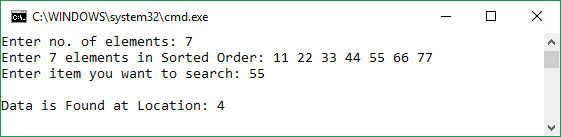
Program Screenshot
Output

#include <iostream.h>
using namespace std;
int a[100];
int main()
{
int n,item,loc;
int binary(int beg,int end,int item);
cout<<"Enter no. of elements: ";
cin>>n;
cout<<"Enter "<<n<<" elements in Sorted Order: ";
for(int i=0;i<n;i++) {
cin>>a[i];
}
cout<<"Enter item you want to search: ";
cin>>item;
loc=binary(0,n,item);
if(a[loc]==item) {
cout<<"\nData is Found at Location: "<<loc<<"\n";
} else {
cout<<"Data is Not Found";
}
}
int binary(int beg,int end,int item)
{
int mid=(beg+end)/2;
if (end < beg) {
    return -1;
}
if (a[mid]==item) {
return(mid);
} else if(a[mid]<item) {
binary(mid+1,end,item);
} else {
binary(beg,mid-1,item);
}
}
Read More >>


     In computer science, a search data structure is any data structure that allows the efficient retrieval of specific items from a set of items, such as a specific record from a database.

The simplest, most general, and least efficient search structure is merely an unordered sequential list of all the items. Locating the desired item in such a list, by the linear search method, inevitably requires a number of operations proportional to the number n of items, in the worst case as well as in the average case. Useful search data structures allow faster retrieval; however, they are limited to queries of some specific kind. Moreover, since the cost of building such structures is at least proportional to n, they only pay off if several queries are to be performed on the same database (or on a database that changes little between queries).
Information source: wikipedia.org


Program:->

Program Screenshot
Output

#include <iostream>
using namespace std;
int main()
{
int loc,n,data,a[100];
cout<<"Enter no. of values: ";
cin>>n;
cout<<"Enter "<<n<<" values: ";
for(int x=0;x<n;x++) {
cin>>a[x];
}
cout<<"Entered array is: "<<"\n";
for(int x=0;x<n;x++) {
cout<<a[x]<<"  ";
}
cout<<"\nEnter data to search: ";
cin>>data;
for(int x=0;x<n;x++) {
if(data==a[x]) {
cout<<"Location is: "<<x<<"\n";
loc=x;
break;
}
loc=x;
}
if(data!=a[loc]) {
cout<<"Element not found\n";
}
return(0);
}

Read More >>


Program Screenshot
Output


#include <iostream>

using namespace std;
int insertionSort(int a[],int n);
int main()
{
int n,data,a[100];
cout<<"Enter no. of values: ";
cin>>n;
cout<<"Enter "<<n<<" values: ";
for(int x=0;x<n;x++) {
cin>>a[x];
}
insertionSort(a,n);
cout<<"Array after Sorting using Insertion Sort: \n";
for(int x=0;x<n;x++) {
cout<<a[x]<<"\n";
}
return(0);
}
int insertionSort(int a[],int n)
{
int pivot,temp;
for(int startPos=1;startPos<n;startPos++) {
pivot=startPos;
while(pivot >= 1 && a[pivot] < a[pivot-1]) {
temp=a[pivot];
a[pivot]=a[pivot-1];
a[pivot-1]=temp;
pivot--;
}
}
}

Read More >>

Saturday, 16 January 2016


Program ScreenShot

#include<iostream>
using namespace std;
int main()
{
int a[100][100];
int r,c;
cout<<"Enter no. of rows & columns: ";
cin>>r>>c;;
cout<<"Enter "<<r*c<<" values : ";
for(int i=0;i<r;i++) {
for(int j=0;j<c;j++) {
cin>>a[i][j];
}
}
for(int i=0;i<r;i++) {
for(int j=0;j<c;j++) {
a[i][c]+=a[i][j];
}

}
for(int i=0;i<r;i++) {
for(int j=0;j<c+1;j++) {
a[r][j]+=a[i][j];
}

}
cout<<"SUM : "<<"\n";
for(int i=0;i<r+1;i++) {
for(int j=0;j<c+1;j++) {
cout<<a[i][j]<<" ";
}
cout<<"\n";
}
}

Read More >>


Program ScreenShot

#include <iostream>

using namespace std;
int quickSort(int a[],int l,int r);
int main()
{
int n,data,a[100];
cout<<"Enter no. of values: ";
cin>>n;
cout<<"Enter "<<n<<" values : ";
for(int x=0;x<n;x++) {
cin>>a[x];
}
quickSort(a,0,n);
cout<<"Array after Sorting using Quick Sort: \n";
for(int x=0;x<n;x++) {
cout<<a[x]<<"\n";
}
return(0);
}
int quickSort(int a[],int l,int r)
{
int temp;
if(r-l<=1) {
return(0);
}
int y=l+1;
for(int g=l+1;g<r;g++) {
if(a[g]<=a[l]) {
temp=a[y];
a[y]=a[g];
a[g]=temp;
y++;
}
}
temp=a[y-1];
a[y-1]=a[l];
a[l]=temp;
quickSort(a,l,y-1);
quickSort(a,y,r);
}
Read More >>


Bubble sort, sometimes referred to as sinking sort, is a simple sorting algorithm that repeatedly steps through the list to be sorted, compares each pair of adjacent items and swaps them if they are in the wrong order. 

The pass through the list is repeated until no swaps are needed, which indicates that the list is sorted. The algorithm, which is a comparison sort, is named for the way smaller elements "bubble" to the top of the list. Although the algorithm is simple, it is too slow and impractical for most problems even when compared to insertion sort. It can be practical if the input is usually in sorted order but may occasionally have some out-of-order elements nearly in position.

Performance:->

  • Best case: O(n)
  • Average case: О(n2)
  • Worst case: О(n2)

Information source: wikipedia.org


Program:->

Program Output
Output
#include <iostream>
using namespace std;
int bubble(int *ptr,int n);
int main()
{
int n,data,a[100];
int *ptr;
ptr=a;
cout<<"Enter no. of values: ";
cin>>n;
cout<<"Enter "<<n<<" values: ";
for(int x=0;x<n;x++) {
cin>>*(ptr+x);
}
bubble(ptr,n);
cout<<"Array after Sorting using BUBBLE Sort: \n";
for(int x=0;x<n;x++) {
cout<<*(ptr+x)<<"\n";
}
return(0);
}
int bubble(int *ptr,int n)
{
int x,temp;
for(int k=0;k<n;k++) {
x=0;
while(x<n-k-1) {
if(*(ptr+x)>*(ptr+x+1)) {
temp=*(ptr+x+1);
*(ptr+x+1)=*(ptr+x);
*(ptr+x)=temp;
}
x=x+1;
}
}
}

Read More >>


An array type is a data type that is meant to describe a collection of elements (values or variables), each selected by one or more indices (identifying keys) that can be computed at run time by the program. Such a collection is usually called an array variablearray value, or simply array. By analogy with the mathematical concepts of vector and matrix, array types with one and two indices are often called vector type and matrix type, respectively.

In order to effectively implement variables of such types as array structures (with indexing done by pointer arithmetic), many languages restrict the indices to integer data types (or other types that can be interpreted as integers, such as bytes and enumerated types), and require that all elements have the same data type and storage size. Most of those languages also restrict each index to a finite interval of integers, that remains fixed throughout the lifetime of the array variable. In some compiled languages, in fact, the index ranges may have to be known at compile time.
Information source: wikipedia.org


Program:->
Program ScreenShot
Output


#include <iostream.h>
using namespace std;
int main() {
   int arr[30], i, j, num, temp;

   cout<<"Enter no. of elements : ";
   cin>>num;
   cout<<"Enter "<<num<<" values : ";
   for (i = 0; i < num; i++) {
      cin>>arr[i];
   }
   j = num - 1;
   i = 0;  
   while (i < j) {
      temp = arr[i];
      arr[i] = arr[j];
      arr[j] = temp;
      i++;
      j--;
   }
   cout<<"\nResult after reversal : ";
   for (i = 0; i < num; i++) {
      cout<<arr[i]<<"   ";
   }
   return (0);
}
Read More >>


Copyright © 2016 - ProgrmIt - All Rights Reserved
(Articles Cannot Be Reproduced Without Author Permission.)
Design By : | Powered By: Blogger